Payment links for businesses offer a direct way to collect payments without building a custom checkout integration. A business creates a link to a payment page and shares it with the customer. But the link is only one part of the process: how the request is identified, how payment status is tracked, and how funds are reconciled determine whether it fits the wider payment workflow.
Links, invoices, payment forms, and hosted checkout serve different purposes. A link can suit a one-off or remote collection, while an invoice can document an itemized charge and hosted checkout can support a website sales journey. This article explains how links work, where they fit, and which operational and security controls to consider. It also covers how payment collection relates to separate currency-conversion and payout stages, and how KeyBS Pay’s payment links sit alongside its hosted Checkout and E-Invoicing offerings.
Key Takeaways
- ▸Use payment links for businesses when you need a direct way to collect payment without relying on a full online store.
- ▸Choose between a link, invoice, or hosted checkout based on the customer journey and the records your process requires.
- ▸Track each collection from link creation through payment status, then reconcile it against your business records.
- ▸Set clear ownership, access, payment-purpose, and recordkeeping controls to support responsible link use.
- ▸Understand how payment collection fits with separate FX, treasury, and payout workflows in a broader business payments platform.
What Are Payment Links for Businesses, and What Problem Do They Solve?
A payment link gives a customer a shareable route to an online payment page. A business can send it by email or messaging, allowing the customer to proceed to payment without first visiting a full online store. The link is an entry point to a collection process, not the underlying payment system, payment rail, or bank account. Payment processing and the movement of funds happen through the relevant provider and financial infrastructure.
Payment links for businesses are useful when a sale or service request happens outside a conventional ecommerce journey. A business may not need a product catalogue, shopping cart, or custom website integration for every collection. The link handles one part of the workflow: giving the customer a route to pay. It does not replace the records, customer communications, or financial processes that support the transaction.
How a payment link differs from a website checkout
A payment link can take a customer to a hosted payment page, where they enter payment details within the provider’s checkout environment. The business shares the route directly instead of embedding a payment flow in its website. Creating the link may involve a provider account or setup process, but the customer-facing link does not require the business to build an online store.
A website checkout usually sits within a wider shopping journey. Customers may browse products, add items to a cart, and pay with order details attached. A direct link is generally better suited to a defined request, such as paying for an agreed service or deposit. The available checkout fields and payment options depend on the provider and configuration, so do not assume a link supports the same purchase flow as an integrated store.
Which business collection scenarios can use a link?
Consider a service business that has sent a quotation and agreed the scope with its customer. It can share a payment link for the agreed amount or request a deposit. The quote or service agreement still records what was agreed; the link provides a route to pay, not a replacement for those documents.
Links can also suit remote sales where a customer and seller communicate digitally but do not complete a transaction through a shared ecommerce storefront. A business might send a collection request after discussing a service, confirming an order, or arranging work remotely. Make the amount and purpose clear, especially when the link is sent separately from the original conversation.
KeyBS Pay offers Payment Links alongside hosted Checkout and E-Invoicing, giving businesses separate ways to collect payment, support a checkout journey, and document billing. Choose the method according to the transaction and the records it requires, while retaining the invoicing, accounting, and reconciliation processes your business uses.
How a Business Payment Link Moves from Creation to Payment Status
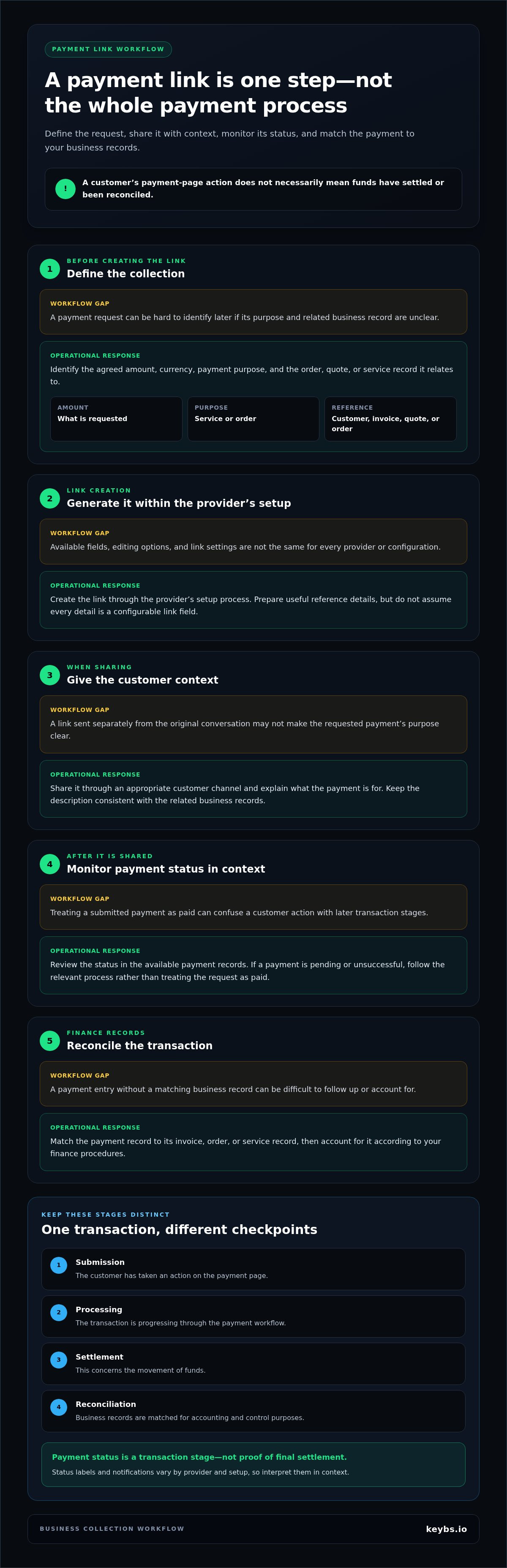
A reliable process starts before a link is sent. Define what the payment is for and how it will be identified, then track it through the available payment and business records. For payment links for businesses, a customer’s action on a payment page is one event in the transaction lifecycle. It does not necessarily mean funds have settled or been reconciled.
- ▸Define the collection. Identify the agreed amount, currency, payment purpose, and the order, quote, or service record the payment relates to.
- ▸Generate the link. Create it using the provider’s setup process. Available fields, editing options, and link settings depend on the provider and configuration.
- ▸Share it with context. Send the link through an appropriate customer channel and explain what the requested payment is for.
- ▸Monitor its status. Review the status in the available business workflow or payment records. If a payment is pending or unsuccessful, follow the relevant process rather than treating the request as paid.
- ▸Reconcile the transaction. Match the payment record to the corresponding invoice, order, or service record, then account for it according to your finance procedures.
What information should the business prepare?
Before creating a link, gather the details that make the collection clear and traceable. Depending on the transaction and provider setup, useful reference information may include:
- ▸The amount and currency being requested.
- ▸A concise payment purpose, such as the service or order involved.
- ▸A customer, invoice, quotation, or order reference for internal matching.
Use consistent descriptions in customer communications and finance records. A recognizable order reference, for example, can help your team connect a payment entry to the correct order later. These details are good preparation, though not every provider makes each one a configurable link field.
What should happen after the link is shared?
Track the transaction using your business records, and retain enough context to identify which request the customer acted on. Payment-page submission, processing, settlement, and reconciliation are distinct concepts. Submission means the customer has taken an action. Processing describes the transaction’s progress through the payment workflow. Settlement concerns the movement of funds, while reconciliation matches records for accounting and control purposes.
Payment status is a transaction stage, not proof of final settlement. Status labels and notifications vary by provider and setup, so interpret them in context. Do not treat a submitted payment as settled funds. Consistent references between payment records and invoices or service records also make follow-up and reconciliation easier. You can review KeyBS Pay payment links as part of a wider business collection workflow.
Payment Links vs Invoices and Hosted Checkout: Choosing the Right Collection Method
Choose a collection method based on what the customer needs to do and what the business needs to document. A link can simplify a defined payment request, an invoice can explain the basis of a charge, and hosted checkout can support a structured website journey. These methods can work together; choosing one does not automatically remove the need for another.
| Method | Purpose | Customer journey | Recordkeeping context | Operational fit |
|---|---|---|---|---|
| Payment link | Request payment for a defined collection | Customer follows a shared route to a payment page | Needs a reference connecting the payment to an order, service, or invoice | Useful for direct, remote requests where a full store journey is unnecessary |
| Invoice | Document billed goods or services and the amount due | Customer reviews the billing document and follows its payment instructions, if provided | Creates a billing record for finance and customer reference | Better suited when itemized billing or formal documentation is central to the process |
| Integrated hosted checkout | Accept payment within a website or digital sales flow | Customer moves through a checkout journey connected to the business experience | May align transaction information with the relevant order or sales process, depending on setup | Fits recurring website sales, structured product selection, or deeper workflow integration |
When is a payment link more practical than an invoice?
A link can be a practical collection route when the amount and purpose are already clear, such as an agreed deposit or defined service charge. An invoice has a broader documentation role: it identifies what is being billed and provides a reference for the amount due. Some businesses issue an invoice and share a link as a separate way to collect against it. Do not treat the link as a replacement for documents required by your contractual, accounting, or internal processes.
When does hosted checkout or an integration fit better?
Hosted checkout can suit a business whose customers select products or services on a website before paying. An integration may fit when payments need to connect with wider sales or operational systems. This can create a more structured customer journey, but usually involves more workflow design than sending a direct collection route. The setup depends on the platform and the business’s requirements.
Payment links for businesses are a focused option, but may offer less control over the customer journey than a tailored checkout. Their fields and behavior also depend on provider configuration. To choose, ask whether the transaction is already defined, whether the customer needs an invoice or item selection, and how the payment will be recorded. KeyBS Pay offers Payment Links, E-Invoicing, and hosted Checkout for these related but distinct collection and documentation needs.
Operational Controls for Using Business Payment Links Responsibly
A payment link simplifies the route to a payment page, but it does not establish who is authorized to issue a request, verify the customer, or confirm that funds have been received. Set controls for link ownership, accurate payment purpose, access management, and transaction records. These practices help limit avoidable errors and make it easier to review what was requested, what happened, and how the transaction was recorded.
A payment request and a completed, reconciled transaction are different records. A customer may act on a link without the payment reaching its final stage, and a displayed status does not replace reconciliation. A link alone also does not guarantee payment or eliminate disputes.
- ▸Assign ownership: Define which roles can create and share payment requests, and how each request connects to a business transaction.
- ▸State the purpose accurately: Keep the amount, currency, and description consistent with the agreed goods or services.
- ▸Manage access: Apply appropriate access practices to the systems and accounts used to create and review links.
- ▸Preserve the record: Connect the request and its status to the relevant customer, order, service, or invoice records.
Reduce avoidable errors before sharing a link
Before sending a link, compare its amount, currency, recipient context, and payment description with the underlying agreement or order. A second-person review may be appropriate for higher-risk requests or when an incorrect amount could cause material disruption. You can also establish a consistent way to identify duplicate requests, such as recording the related order or invoice before sending a link. These are general control practices, not assumptions about a provider’s approval tools.
Keep transaction records suitable for review
Retain the payment purpose, a customer or order reference, the status shown in the available workflow, and the reconciliation outcome. Record unresolved or unsuccessful requests according to internal procedures rather than treating the original request as proof of receipt. Finance teams should follow their accounting and record-retention policies, including requirements that apply to the business and transaction.
Security also depends on the payment provider’s processing environment and the controls that apply to each party’s role. PCI DSS v4.0.1 is the current Payment Card Industry Data Security Standard; organizations that store, process, or transmit payment card data must comply. Using a hosted payment page does not by itself establish a provider’s certification or determine the business’s responsibilities. Review the relevant arrangements and scope rather than making assumptions based on the link format alone.
For cross-border collections, keep collection, foreign-exchange conversion, settlement, and payout distinct in operational records. These are separate stages, and a payment link is not evidence that conversion or payout has occurred. Explore KeyBS Pay payment links as one part of a business collection process.
How KeyBS Pay Fits Payment Links into Business Collection Workflows
KeyBS Pay offers Payment Links alongside hosted Checkout and E-Invoicing. Each has a different operational purpose: a link gives a customer a route to pay, checkout supports a hosted payment journey, and e-invoicing supports billing documentation. The right workflow depends on how a business initiates a collection, what records it needs, and how the transaction fits into wider payment operations.
For businesses operating across borders, collection may connect to other activities, including currency conversion, treasury management, and payouts. Treat these as distinct stages, not automatic consequences of sending or paying through a link. KeyBS Pay operates as a technology platform, with regulated financial services delivered through licensed partners where applicable.
Separate collection from conversion and payout
Accepting a customer payment, converting currency, and paying out funds are separate stages that may involve different processes and conditions. Payment pricing can depend on factors such as the payment corridor, currency, amount, funding method, and settlement method. These considerations relate to the payment arrangement, not to an assumption that every factor is a configurable payment-link feature. Assess the full transaction flow, including how collected funds are handled after payment.
KeyBS Pay’s broader platform includes cross-border payment and multi-currency account capabilities, as well as FX and treasury services. These services provide wider operational context, but are distinct from link functionality. Global payouts are also a separate offering, not a statement about which currencies a payment link supports or when a link-related payment settles.
Assess whether the workflow matches the business need
Before choosing a collection method, consider the payment’s purpose, the customer journey, the records required, and whether the transaction is part of a cross-border process. A defined collection request may suit a link; a billing process that needs formal documentation may also involve e-invoicing; and a website sales journey may call for hosted checkout. The wider workflow should account for reconciliation and any separate conversion or payout steps.
Payment links for businesses can support collection without defining every subsequent financial operation. KeyBS Pay brings payment links together with checkout and e-invoicing in a wider business payments platform that also includes FX and treasury services, global payout workflows, and Global Business Account capabilities. This gives businesses a way to consider collection alongside related operations while keeping payment acceptance, currency conversion, and payouts distinct.
To explore how these offerings fit a business payment workflow, Explore KeyBS Pay business payment solutions.
Set Up a Collection Workflow That Can Grow With Your Business
Decide how customers should receive payment requests, how transactions will connect to internal records, and how collected funds fit into later financial operations. Payment links for businesses can support that process, but the wider workflow should reflect your sales model and cross-border requirements rather than treating collection as an isolated task.
KeyBS Pay brings payment links together with hosted checkout and e-invoicing, alongside cross-border business payment and multi-currency workflows. This lets businesses consider collection alongside related operational needs while keeping payment acceptance, currency conversion, and payouts distinct.
Review the workflow your business needs, then explore KeyBS Pay business payment solutions to identify a suitable next step for your payment operations.
Frequently Asked Questions
Can payment links support recurring payments?
Some providers offer recurring billing or subscription workflows, while others design payment links mainly for one-time collections. A reusable link is not itself authorization to charge the same customer again. Before setting up recurring payments, review the provider’s terms, obtain and retain the customer’s required consent, and define billing frequency, amount, cancellation handling, and records for each charge. This prevents treating repeat access as ongoing permission.
How much do payment links cost for a business?
Costs depend on the provider and transaction details, which can include the payment corridor, currency, amount, funding method, and settlement method. Some providers publish standard fees; others use route-specific pricing or quotations. KeyBS Pay payment pricing varies by corridor and transaction details. To assess the full cost, consider applicable transaction and currency-conversion charges rather than focusing only on whether creating a link has a separate charge.
What happens if a customer pays a payment link twice?
A customer may be able to submit more than one payment if the link remains usable, but duplicate-payment handling depends on the link and checkout configuration. Check transaction records against the relevant order or service before treating multiple entries as separate purchases. If you identify a duplicate, follow established refund and reconciliation procedures, record the outcome, and update the related business record so the extra payment is not mistaken for a new sale.
Do payment links automatically send receipts?
Receipt delivery depends on the provider’s features, configuration, and transaction workflow, so do not assume sharing a link triggers a receipt after every successful payment. Review what confirmation the customer receives and whether it identifies the transaction clearly enough for their records. Keep the business’s own records as well, using an order or invoice reference to connect the payment to its purpose.
Can a payment link collect sales tax?
A payment link does not determine whether tax applies or calculate the correct amount for every transaction. Tax treatment depends on the goods or services, transaction details, and the business’s applicable obligations. For example, a business selling different types of services may need to account for them differently. Use the business’s tax and accounting processes to establish the amount requested and ensure any tax presentation matches those processes.
How should businesses reconcile payment-link transactions?
Match each payment record to its business purpose, such as a customer, invoice, order, or service reference, then compare payment and settlement records with accounting entries. Keep fees and currency conversion identifiable as separate amounts where applicable, so differences between the customer payment and recorded proceeds can be reviewed. Document follow-up and resolution for unmatched entries. The precise process depends on the records available and the business’s finance controls.